You know the feeling. You ask your coding agent to build a page, it builds the page, and then comes the part nobody talks about - giving feedback. “The button under the hero, no, the other one, move it left a bit, and the contrast on the subtitle is off.” You are sitting there describing pixels in prose, the agent is guessing, and you both know it. This is the part of the loop that is broken, and it had been bugging me for a while.
I do a lot of work with Claude Code (CC from here on out), and the design feedback dance always went the same way: take a screenshot, paste it in, type three paragraphs trying to point at things, watch it fix the wrong thing, repeat. Screenshots lose interactivity. Words lose precision. And pointing - actual pointing, “this thing, here” - just wasn’t an option. The itch was set.
The broken handoff
What I actually wanted was simple to say and annoying to build: let me mark up the real page, the live DOM, the way I would scribble on a printout - then hand that scribble to the agent in a form it can act on. Not a screenshot of my intentions. The intentions themselves, attached to the elements they belong to.
So that became the thing. A browser extension to capture the feedback, a way to get it to the agent, and the agent knowing what to do with it once it arrives. Three problems, one of them genuinely interesting.
What a mark is
The unit is a mark - a single annotation on the page. You open the extension on any page, hit “Start annotating”, and pick a tool:
- Callout - drop a numbered marker, auto-incremented
- Text - a free-floating note
- Arrow - drag from one element to another
- Highlight - select real text, get a real highlight
- Element - click a whole element to comment on it
The marks pile up in a changelog panel on the side, each with your note.
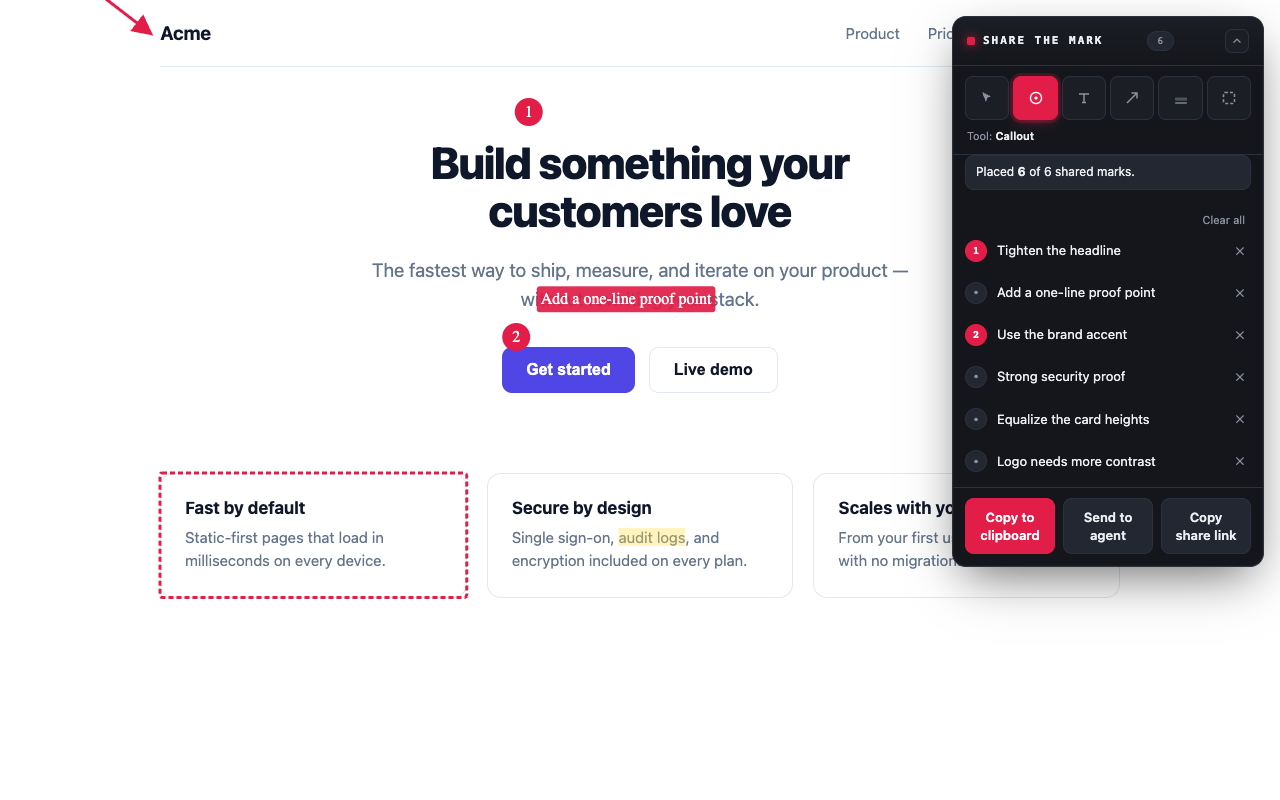
The collection of them is a change-brief. When you are done you can copy it, share it, or send it straight to the agent. The copied version is just Markdown plus an annotated screenshot, and it looks like this:
# Change brief — Landing page
Source: https://example.com/
Captured: 2026-06-29T08:12:04Z

1. Move this button into the hero, align right
   Element: `#hero [data-testid="cta"]`
2. Contrast too low, this needs to pass AA
   Element: `#hero p.subtitle`
That is it. A numbered list of “do this, to that element”. An agent can read that. More importantly, it can map #hero p.subtitle to a line of source and just go.
The part I actually care about
Here is the problem that made this worth building. If you anchor an annotation to a pixel coordinate, it is dead the moment the page reflows. Scroll, resize, a re-render that swaps a node - and your careful mark is now pointing at empty space. Useless. And modern pages reflow constantly.
So marks are content-anchored, not coordinate-anchored. Every annotation stores three things: a CSS selector for the rough neighbourhood, a character-offset position within that element, and the exact text plus a bit of prefix/suffix context around it (this is the W3C Web Annotation text-quote model, the same idea Hypothesis uses). On render it tries the offset, checks it against the stored quote, and if the DOM has shifted under it, it falls back to a fuzzy search to find where the text went. The mark re-anchors itself. It survives scroll, resize, reflow, even node-replacing re-renders.
The selector engine is its own little rabbit hole. Picking a selector that is both stable and unique is harder than it sounds - you want #id, but not if the id is a framework-generated hash like :r123abc:; you want [data-testid] if it is there, then semantic attributes, and only as a last resort a structural :nth-of-type() path. Each candidate gets verified to match exactly one element before it is trusted. I leaned on property-based testing here (fast-check): generate a random DOM tree, pick a node, compute its selector, resolve it back, assert you landed on the same node. Thousands of random trees, every run. That is the kind of thing I will never test thoroughly by hand and will absolutely get wrong by hand.
Getting it to the agent
Capturing feedback is half the job; the other half is the handoff, and I wanted it to be boring in the best way.
When you hit “Send to agent”, the extension POSTs the brief to a small daemon listening on 127.0.0.1:8787. The daemon - a little Rust binary - drops the Markdown and screenshot into a folder and hands back a token:
✓ sent — paste to your agent: share-the-mark show ab12You paste that one line into CC. It runs share-the-mark show ab12, gets the brief and a path to the annotated screenshot, and acts on it. There is also the reverse flow: the agent can run share-the-mark request <url>, which pops the page open in your browser and blocks until you have marked it up and sent it back - so the agent can ask you for feedback and wait, instead of guessing.
flowchart LR
    A["You mark up<br/>the live page"] -->|change-brief| B["Browser<br/>extension"]
    B -->|"POST /brief"| C["Local daemon<br/>127.0.0.1:8787"]
    C -->|stores| D["brief.md +<br/>screenshot"]
    C -.->|"share-the-mark show id"| E["Coding agent<br/>(Claude Code)"]
    E -->|"selector → source"| F["Code change"]
    E -.->|"share-the-mark request url"| B
The dotted arrows are the two ways the loop closes: you push a brief to the agent, or the agent pulls one from you. Same daemon, same brief, either direction.
The bit I am quietly happy about: the CC integration is not an MCP. It is a Skill - a plain Markdown file that teaches the agent the handful of commands and when to reach for them. The header is just this:
name: share-the-mark
description: Read design-feedback change-briefs captured by the
  share-the-mark browser extension via the local `share-the-mark` CLI.
  Use when the user pastes a `share-the-mark show <id>` command, mentions
  a share-the-mark brief / mark / change-brief, or asks to act on
  visual/design feedback from a web page.
No persistent server in the agent’s context, no protocol to babysit. The agent shells out, reads stdout, moves on. Decoupled, simple, and it works with anything that can run a command - not just CC. After my MCP experiments the restraint felt like a small win.
One thing I refused to compromise on was privacy, because a tool that reads your screen has no business phoning home. No analytics, no telemetry, no remote calls. The extension installs with no host permissions and no scary warning - it asks for access to a page only when you actually annotate it, and the localhost daemon is opt-in. Your screenshots never leave the machine unless you send them somewhere yourself.
A different kind of build
This one was built differently from my usual scratch-and-go. tokF was two days of vibe-coding and momentum; share-the-mark started with a SPEC.md - a proper, ~750-line specification that I wrote and argued with CC about before a line of the real thing existed. Spec first, then code, with the quality gates (strict types, lint, ≥90% coverage, e2e against a real built extension, a bundle-size budget) bolted on from commit one rather than as a cleanup pass later.
I will be honest about why: the content-anchoring logic is the kind of thing where “looks fine” and “actually correct” are very far apart, and I did not trust vibes to get me there. The pure core - selectors, the annotation model, the Markdown conversion - is browser-free and tested to near-100%, so I could hammer on the hard logic without ever opening a browser. It is a different muscle than the quick tools, and a useful reminder that the discipline you skip is the discipline you pay for later.
Where it is now
It is real and it is out: a WXT extension (Chrome and Firefox from one codebase), the Rust CLI with its daemon and skill, and - because I apparently cannot help myself - an embeddable widget so the same annotation UI can run without the extension at all. Code and docs are at github.com/mpecan/share-the-mark, and there is a site at share-the-mark.com.
What is next is the usual: the distribution grind, which - same as last time - is harder than the building. And I want to use it in anger for a few weeks to find out where the marks actually break down in real feedback sessions, because they will.
If you try it, or if you think the whole premise is wrong and I should have just gotten better at describing buttons, tell me on Bluesky. I read everything, I swear.
Comments
Loading comments...